Clip#
The Clip class is inspired by some DAWs such as Ableton Live and Bitwig Studio.
Initialize#
Initialize an empty clip.
>>> from infmidi import Clip
>>> Clip()
Initialize with items.
>>> from infmidi import Note, Clip
>>> items = [Note('C4'), Note('E4'), Note('G4')]
>>> clip = Clip(items)
>>> clip
Clip(len(notes)=3, len(events)=0, length=1.00)
>>> clip.notes
NoteSet([
  Note(name="C4", value=60, freq=261.63, velocity=127, length=1.00, location=0.00, channel=0),
  Note(name="E4", value=64, freq=329.63, velocity=127, length=1.00, location=0.00, channel=0),
  Note(name="G4", value=67, freq=392.00, velocity=127, length=1.00, location=0.00, channel=0)
])
Item could be Note、Event or Clip.
>>> from infmidi import Note, PitchBend, Clip
>>> item1 = Note('B4')
>>> item2 = PitchBend(0.5)
>>> item3 = Clip([Note('C4'), Note('E4'), Note('G4')])
>>> items = [item1, item2, item3]
>>> clip = Clip(items)
>>> clip
Clip(len(notes)=4, len(events)=1, length=1.00)
>>> clip.notes
NoteSet([
  Note(name="C4", value=60, freq=261.63, velocity=127, length=1.00, location=0.00, channel=0),
  Note(name="E4", value=64, freq=329.63, velocity=127, length=1.00, location=0.00, channel=0),
  Note(name="G4", value=67, freq=392.00, velocity=127, length=1.00, location=0.00, channel=0),
  Note(name="B4", value=71, freq=493.88, velocity=127, length=1.00, location=0.00, channel=0)
])
>>> clip.events
EventSet([PitchBend(pitch=0.50, location=0.00, channel=0)])
NoteSet & EventSet#
The notes and events in Clip are save in a NoteSet object and a NoteSet object respectly.
Note
The NoteSet and EventSet are inherited from sortedcontainers.SortedSet.
There are two rules to add Note to NoteSet.
If there is a note in
NoteSetwith the samevalue,locationandchannelas the newly added one, the old one will be replaced.If the existing notes in the
NoteSetoverlaps with the newly added one, the lengths of those notes are reduced to eliminate the overlap.>>> from infmidi import Note, NoteSet >>> ns = NoteSet() >>> ns.add(Note('C4')) >>> ns NoteSet([Note(name="C4", value=60, freq=261.63, velocity=127, length=1.00, location=0.00, channel=0)]) >>> ns.add(Note('C4', velocity=66, location=5, channel=6)) >>> ns NoteSet([ Note(name="C4", value=60, freq=261.63, velocity=127, length=1.00, location=0.00, channel=0), Note(name="A4", value=69, freq=440.00, velocity=66, length=1.00, location=5.00, channel=6) ]) >>> ns.add(Note('C4', velocity=77, length=3., location=5, channel=6)) >>> ns NoteSet([ Note(name="C4", value=60, freq=261.63, velocity=127, length=1.00, location=0.00, channel=0), Note(name="A4", value=69, freq=440.00, velocity=77, length=3.00, location=5.00, channel=6) ]) >>> ns.add(Note('C4', location=0.5)) >>> ns NoteSet([ Note(name="C4", value=60, freq=261.63, velocity=127, length=0.50, location=0.00, channel=0), Note(name="C4", value=60, freq=261.63, velocity=127, length=1.00, location=0.50, channel=0), Note(name="A4", value=69, freq=440.00, velocity=77, length=3.00, location=5.00, channel=6) ])
There is one rule to add Event to EventSet.
If there is a event in
EventSetwith the same__class__,locationandchannelas the newly added one, the old one will be replaced.
Add & Remove item#
Time & Pitch shift#
>>> clip = Clip([Note('C4'), Note('E4') >> 1, Note('G4') >> 2])
>>> plot(clip)
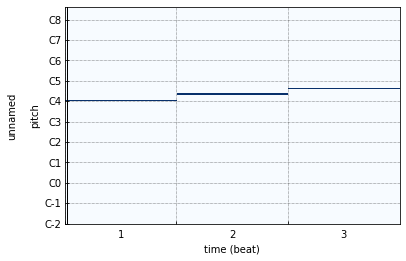
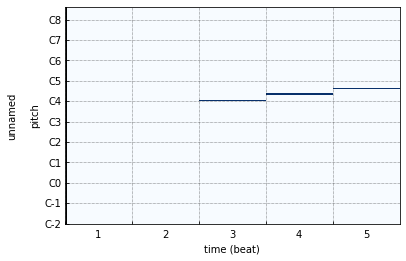
Using >> to shift the notes to the right along the timeline.
>>> plot(clip >> 2)
Scale & Zoom#
Concat & Extend#
>>> clip = chord('C4:M7') | chord('A4:m7') | chord('F4:M7') | chord('G4:7')
>>> plot(clip)
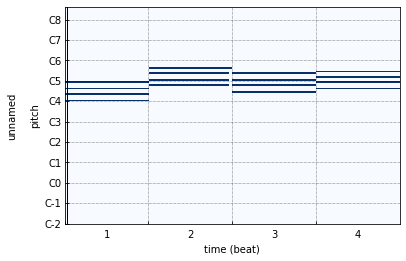
The following has the same result.
>>> clip = Clip()
>>> clip.extend([chord('C4:M7'), chord('A4:m7'), chord('F4:M7'), chord('G4:7')])
>>> plot(clip)
Rverse & Invert#
Repeat#
>>> clip = Clip([Note()])
Channel select#
Slice#
It’s very usefull for you to send messages to different Track in DAW.
Hint
All operators above have an inpalce version and an method version, click here to see the cheat sheet.